Modern mid-range laptops are transforming AI and Machine Learning education. These machines now offer the specialized hardware needed to run complex AI models directly on a personal device. This ability empowers students to engage in practical AI development. They can do this without relying on expensive cloud services or high-end lab equipment.
The Shift to Local AI Development
Running sophisticated machine learning models locally on a personal laptop marks a major change for AI students. Historically, advanced AI tasks often required access to powerful servers or cloud-based computing resources. However, advancements in laptop hardware have made local execution a practical and affordable option. This shift is particularly evident in the price range around 60,000 rupees. This offers a sweet spot for students seeking capable AI machines. Moving past 50K rupees often brings greatly better graphics and processors.
A key component driving this change is the Graphics Processing Unit (GPU). Its associated Video Random Access Memory (VRAM) is also vital. In AI and machine learning, VRAM capacity is paramount. It directly determines the size of data models or neural networks a laptop can hold in memory. Insufficient VRAM leads to “out of memory” errors, halting training or inference processes. Laptops in this segment now come with dedicated GPUs and sufficient VRAM. This allows students to move beyond basic CPU-only execution. They can dive into hardware-accelerated deep learning tasks. This democratizes access to practical AI experimentation, fostering a new generation of developers.
Essential Hardware for AI Workloads
Several hardware components work together to make a laptop suitable for AI development. The dedicated GPU is central. It provides the parallel processing power needed for training neural networks. Models like the Nvidia GeForce RTX 3050 and the more powerful RTX 4050 are common in student-focused AI laptops. The RTX 4050, for instance, can offer 6GB of VRAM. This extra 2GB of VRAM compared to typical RTX 3050 configurations allows for training greatly larger batch sizes in deep learning pipelines. It also supports experimenting with generative adversarial networks (GANs) and running larger language models (LLMs) locally.
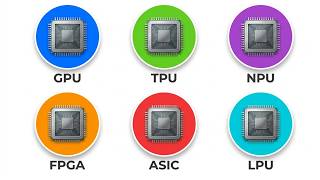
Beyond the GPU, a Neural Processing Unit (NPU) is becoming increasingly important. An NPU is a specialized processor designed to accelerate AI tasks directly on the device. For example, a 50 TOPS NPU can run local, quantized small language models like Llama 3. It does this directly on the chip. This reduces the need for a heavy gaming rig. It also allows for on-device AI, natural language processing, and prompt engineering.
The Central Processing Unit (CPU) also plays a vital role. This is especially true for data preprocessing and general computing tasks. Processors like the AMD Ryzen AI7, Intel Core i5, or AMD Ryzen 7 7000 HS series provide ample processing power. An 8-core CPU, for instance, is excellent for multitasking and heavy data processing. This is true where parallel processing is required. This includes cleaning massive CSV datasets or running local Docker containers. Ample RAM, typically 16 GB of LPDDR5X or DDR5, is important. Fast storage like a 512GB Gen 4 SSD or NVME drive also helps. These ensure smooth operation and quick data access.
Balancing Performance and Portability
AI student laptops come in various designs. They offer different trade-offs between performance, portability, and battery life. Some models prioritize a thin and light form factor, making them ideal for campus mobility. An example is a laptop weighing just 1.4 kg, built for maximum portability. These machines often feature large batteries. A 75-watt hour battery, for example, can last 7 to 8 hours. This is during active text editing and programming. They are well-suited for students focusing on on-device AI and hybrid cloud execution. Here, all-day battery life is a priority.
Other laptops lean towards a more gaming-oriented or rugged design. They often accommodate more powerful cooling systems and higher-wattage GPUs. These might be slightly heavier, around 1.6 kg, but provide exceptional graphics power. Battery life in these performance-focused machines can vary. Some offer around 4 hours of standard usage, often with a 57 W battery. However, some rugged designs can still provide 6.5 hours of productivity. This includes those with a 90W hour battery. The choice depends on a student’s needs. Do they need maximum processing power for intensive training? Or a lightweight machine for daily tasks and local AI agents? Some models also include features like a crisp 2K display or 144 Hz IPS display panel. Customizable performance software also enhances the user experience. Advanced thermal designs can drop temperatures by 5%. Some laptops also support fast charging, such as 140 watt Type-C charging.
Practical Applications for AI Students
These capable laptops open up a wide range of practical applications for students. For those interested in computer vision, they can run projects using OpenCV and train multi-layer perceptrons. Image recognition tasks, often relying on convolutional neural networks, become feasible on a personal device. Students can also experiment with reinforcement learning models, which are basic in areas like robotics and game AI.
The ability to run larger language models (LLMs) locally is a major advantage. Tools like O Lama allow students to experiment with these complex models without constant internet access or cloud costs. This is particularly useful for prompt engineering and understanding how LLMs behave. And, these laptops can handle heavy data processing tasks. Cleaning large CSV datasets is an example. This is a common first step in many machine learning projects. The hardware also supports running local Docker containers, providing a consistent environment for developing and deploying AI applications.
Choosing the Right AI Student Laptop
Selecting the right AI student laptop depends on a student’s specific academic focus and priorities. For those prioritizing on-device AI, natural language processing, and all-day battery life, a thin and light machine is an excellent choice. It should have a dedicated NPU. Such a laptop allows for running local AI agents and small language models efficiently.
Students engaged in more intensive deep learning will benefit from a laptop with a powerful dedicated GPU and ample VRAM. This includes training convolutional neural networks for image recognition. It also covers experimenting with generative adversarial networks. An RTX 4050 with 6GB of VRAM, for example, offers a major advantage for these tasks. For students who frequently handle large datasets, an 8-core CPU combined with sufficient RAM is important. Strong multitasking abilities are also needed. Regardless of the specific choice, these capable machines are available under 60,000 rupees. This represents a pivotal moment. It makes advanced AI education more accessible than ever before.