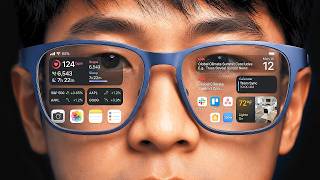
To use augmented reality (AR) on the Meta Quest 3, you simply engage with applications designed for its mixed reality capabilities. The device itself facilitates AR by utilizing its advanced full-color passthrough cameras to display your real-world surroundings while simultaneously overlaying digital content, allowing virtual objects to interact with your physical environment. This means there is no “AR mode” to switch on; the experience is integrated into compatible software.
The Meta Quest 3 is not just a virtual reality headset; it represents a significant step towards practical mixed reality, often blurring the lines between AR and VR. This distinction is important because while traditional virtual reality immerses users entirely in a digital world, augmented reality overlays digital information onto the real world. The Quest 3’s high-fidelity passthrough allows for a seamless blend, providing what Meta refers to as “mixed reality.” This foundational technology enables experiences where virtual characters can appear to walk across your living room floor, or where digital interfaces float on your wall, reacting to your physical space and movements. It operates as a spatial computer, understanding your surroundings and placing digital content within them.
What Mixed Reality on Quest 3 Actually Is
The Meta Quest 3’s core functionality for augmented reality stems from its advanced external camera system. Unlike earlier VR headsets that offered rudimentary, often monochrome, passthrough, the Quest 3 provides a full-color, high-resolution view of your physical surroundings. This “passthrough” feed is what enables mixed reality. When you wear the headset, you are seeing a digital representation of your room, onto which virtual elements are then rendered. This process occurs in real-time, minimizing latency to make the digital overlays feel present and reactive. This fundamental approach marks a departure from simpler AR overlays seen on smartphones, aiming for a deeper level of interaction and spatial awareness. Why Was Augmented Reality Invented to Change How We See the World? details the historical trajectory that led to such advancements.
The device employs computer vision and spatial mapping to build a 3D model of your environment. It identifies surfaces like floors, walls, and furniture, allowing virtual objects to appear grounded in reality. For instance, a virtual game character might duck behind your real couch or a digital ball could bounce off your actual coffee table. This understanding of your space is crucial for convincing mixed reality experiences. Developers leverage Meta’s Presence Platform, a suite of AI and machine learning tools, to create these interactions. This platform processes sensor data, tracks hand movements, and recognizes objects, making the virtual content more interactive and contextually aware. The quality of this spatial understanding directly influences how believable and engaging the mixed reality experiences become.
Why This Technology Works and Its Cost Implications
The effectiveness of Meta Quest 3’s mixed reality relies heavily on several technological pillars: high-resolution cameras, powerful processing, and sophisticated software algorithms. The cameras capture the real world with sufficient detail and color accuracy that the passthrough view is comfortable and usable, even for extended periods. The Snapdragon XR2 Gen 2 chip inside the Quest 3 provides the necessary computational horsepower to process this video feed, run complex spatial mapping algorithms, and render high-fidelity virtual graphics simultaneously, all with minimal noticeable delay. Without this combination of hardware and software, the seamless blending of realities would be impossible. The device also offers a wide field of view, contributing to the feeling of immersion, even with the inherent limitations of current display technologies.
The cost of this technology is reflected in the Meta Quest 3’s price point, which places it as an accessible entry into high-quality mixed reality compared to more specialized, often enterprise-focused, AR headsets. While it’s positioned as a consumer device, its capabilities approach those of more expensive professional hardware. This affordability helps democratize access to advanced spatial computing, enabling a broader ecosystem of developers to experiment and innovate with mixed reality applications. However, this accessibility also means certain compromises compared to dedicated AR glasses, such as the bulkier headset form factor typical of VR devices. The investment goes beyond the hardware; developers must also invest in understanding spatial computing principles and optimizing applications for the Quest’s specific hardware constraints. The growing field of AI, for example, is increasingly relevant for developers to improve spatial awareness and interaction design within these environments. Understanding concepts like Master Prompt Engineering in 29 Min for 2025 AI Productivity might even become valuable for designing intelligent AR experiences.
Where People Get It Wrong About Quest 3 AR
A common misconception is that the Meta Quest 3 offers “true” augmented reality in the same vein as transparent AR glasses that project images directly onto your field of view. Instead, the Quest 3 operates on a “video passthrough” model. You are seeing a live video feed of your environment, not directly through transparent lenses. While incredibly advanced, this still introduces a slight digital layer and can sometimes struggle with extremely bright or low-light conditions, or with fast head movements that might momentarily cause visual distortions or latency. Users might expect the digital overlays to be perfectly stable and high-resolution regardless of lighting or movement, which isn’t always the case with current technology.
Another frequent misunderstanding revolves around the availability and maturity of mixed reality content. While the Quest 3 hardware is capable, the ecosystem of truly innovative and deeply integrated mixed reality applications is still evolving. Many experiences might still feel like early experiments rather than fully polished, long-form content. Some applications might simply place a virtual screen in your room rather than fully leveraging spatial awareness for complex interactions. The true potential lies in experiences that intelligently incorporate the user’s actual environment, allowing for gameplay that transforms your room into an alien battlefield, or productivity tools that extend your digital workspace across physical surfaces. For instance, games like “Scan or Scam” or experiences highlighted in the Meta Quest Store as “Underlie,” “Xploit Zero,” “RealityGuard,” and “Starfall Demo” exemplify early efforts to blend virtual elements into real spaces, ranging from environmental puzzles to spatial combat. The expectation of immediate, widespread utility mirroring current smartphone apps often leads to disappointment, overlooking the iterative nature of this technological development. Broader integration of AI into these platforms, similar to how How Gemini AI Changes Google Drive for Intelligent File Management enhances productivity, will likely drive more sophisticated AR interactions in the future.
Furthermore, users sometimes underestimate the processing demands and the need for a sufficiently lit and uncluttered physical space. Optimal mixed reality requires good lighting for the cameras to accurately map the environment, and a clear area for virtual content to be placed without being obstructed or feeling out of place. Trying to use mixed reality in a dark room or a chaotic space can degrade the experience significantly. Just as new technologies like Fintech AI Pressures Traditional Wealth Management challenge traditional industries, mixed reality challenges users to adapt their physical environment to best suit the digital overlay.
What To Actually Do
To make the most of augmented reality on your Meta Quest 3, start by ensuring your play space is well-lit and relatively clear of obstacles. This provides the best conditions for the headset’s cameras to map your environment accurately. When setting up a new Guardian boundary, take the time to let the headset scan your room thoroughly; this improves its spatial understanding for future mixed reality applications. Explore the Meta Quest Store specifically for applications tagged with “Mixed Reality” or “MR,” as these are designed to leverage the passthrough cameras. Don’t limit yourself to just games; look for productivity tools that can project virtual monitors or educational apps that bring interactive 3D models into your space. Experiment with how virtual objects interact with your furniture and walls, and understand that developers are continuously improving these interactions. Stay updated on software updates for your Quest 3, as Meta frequently releases enhancements that improve passthrough quality, spatial mapping, and overall performance. Approach these experiences with an open mind, recognizing that this technology is still evolving, and its full potential is yet to be realized.